Agile
Reported to the Head of Mobile & Design
Daily stand-ups with the dev team (~20 engineers)
Bi-weekly sprint planning & retrospective


Cisco License Central
Role: UX Product Design Lead
Timeline: March 2024 – August 2025
Type: Zero-to-One Product Creation
Overview
Cisco License Central (CLC) was a zero-to-one product that I led from concept to launch in just 14 months — transforming an early prototype into a fully funded, enterprise-grade solution.
This project gave me the opportunity to build something from nothing: defining the vision, shaping how we worked as a cross-functional team, and integrating AI and automation to simplify complex licensing workflows.
The result was a product that not only drove measurable business impact — including a 10-point NPS improvement upon launch — but also reshaped how Cisco approached licensing as a whole.

How It Started
When I joined Cisco in early 2022, I was part of Experience Design Incubation (XDi) in the Customer Experience (CX) organization. Our team experimented with new ideas for Cisco’s partners and customers.
Later, Cisco IT sought a UX lead to build a brand-new licensing tool — completely from scratch. Because of my prior experience leading licensing design for CX Cloud, I was invited to take on this challenge.
From a data standpoint, we had to move fast. With no predefined sources or architecture, I drew on my prior CX Cloud experience to help the team identify what was viable. We quickly realized that My Cisco Entitlement (MCE) offered the most reliable, ready-to-use data. By using CX Cloud as our design foundation and MCE as our primary data source, we set ourselves up for speed — enabling the team to build a working proof of concept in just eight weeks.
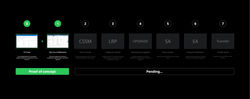 Mapping the Legacy EcosystemAn overview of Cisco’s existing licensing and entitlement tools at the time of project kickoff. This illustration highlights the complex landscape we had to navigate — with My Cisco Entitlement (MCE) and CX Cloud identified as the key systems to leverage for the proof of concept (PoC). |
|---|
The initial scope
Key Challenge
• No requirements, no prior framework — only 8 weeks to create a functioning proof of concept (PoC).
• Goal: Demonstrate the need for a unified licensing platform for internal buy-in and funding.
How I Tackled It
• Partnered closely with an Engineering Lead and Business Architect.
• Reused and adapted the Figure 8 design system from CX Cloud for faster delivery.
• Applied insights from past UX research to compensate for the lack of new research time.
• Created the information architecture and hi-fi screens directly for the dev team.
 High-Level ScreensA snapshot of the core navigation and key workflows that define the overall product experience. |  Information ArchitectureScreens designed over an 8-week period to support the structure and flow of a fully functional enterprise application. |
|---|
Securing Funding
Convincing leadership to fund a new licensing tool in a large organization meant more than showing screens — it meant telling a compelling story.
I reframed the conversation from design to business value. Instead of talking about “user confusion,” I talked about revenue risk and customer retention. I showed that the licensing process wasn’t just a UX problem — it was costing millions in lost renewals and wasted time.
When I presented the demo to the CIO, SVPs, and VPs, I positioned CLC as more than a tool. It was a way to unify seven disjointed systems, simplify internal operations, and create a foundation for automation and sales enablement.
The pitch worked. We secured full funding to transition the proof of concept into an official enterprise product.
What I learned alone the way:
Use visuals to persuade
Design is storytelling made tangible. Visuals are one of UX’s greatest strengths — they turn abstract ideas into something people can see, react to, and rally behind. A clear visual can often move a conversation faster than a dozen slides of explanation.
Frame design in business terms
Impact resonates when it’s measurable. Instead of saying “users are confused by licensing,” framing it as “a 22% onboarding drop-off, equating to $1.4M in lost revenue per quarter” completely changes the discussion. Translating design insights into business metrics earns credibility and drives decisions.
Show the potential
It’s not enough to fix what’s broken — it’s about painting a vision of what’s possible. By reframing CLC as more than a licensing tool — as a sales enablement platform that manages assets, drives renewals, and uncovers new revenue — we shifted the narrative from cost center to growth driver.
Most importantly, develop resilience: not every idea lands the first time. Some need refining, some get set aside, and others evolve in unexpected ways. This project reinforced the importance of persistence — to keep iterating, adapting, and learning until the right solution emerges.
Design System Migration
Once we were funded, one of the first decisions I led was transitioning from the Figure 8 design system we had used for the PoC to Magnetic, Cisco’s modern, scalable, and responsive design system.
The migration to Magnetic wasn’t just a visual upgrade — it was a strategic shift toward a unified, scalable design ecosystem. By aligning with a design system already in use across Cisco Security and other product spaces, the License Central team ensured long-term sustainability, smoother collaboration, and faster adoption across the organization.
Figure 8 (Legacy System)
✅ Magnetic (New System)
Consistency & Governance
Inconsistent patterns across teams, limited design governance.
Unified tokens, shared components, and governance model that ensures consistency.
Scalability
Difficult to extend or adapt to new product lines.
Modular, scalable foundation designed for multi-product growth — already adopted by Cisco Security and several other product spaces.
Efficiency
Redundant effort across design teams; slow ramp-up for new designers.
Streamlined workflows and reusable components that cut design time by ~30%.
Adoption & Support
Limited documentation and community support.
Actively maintained with onboarding resources, templates, and a growing community of contributors.
 Home Page — Figure 8The original static Overview page serving as the main landing screen in the legacy design system. |  Home Page — MagneticThe redesigned Overview page — more data-dense, comprehensive, and responsive — reflecting the transition to the Magnetic design system. |
|---|
Exploring and Learning Magnetic
The migration was not just a translation exercise — it was a learning journey. Transitioning from a fully custom system like Figure 8 to Magnetic meant rethinking layout behavior, accessibility, and interaction patterns. I spent time experimenting with Magnetic’s responsive grid, color tokens, and theming rules, learning how to adapt complex, data-heavy designs to fit a more flexible and scalable framework. The process deepened my understanding of how system design decisions influence usability and visual clarity across diverse use cases.
 Responsive by DesignMagnetic’s native responsive grid adapts seamlessly across screen sizes. Each breakpoint was tested to maintain structural balance and hierarchy, ensuring that even extra-small layouts remained functional and visually consistent. |
|---|
 Accessible Theming for Data-Dense InterfacesLight and dark mode variations of the dashboard, leveraging Magnetic’s built-in theming. Applying its color system taught me practical accessibility principles for high-density data visualization — particularly around contrast ratios and clarity in complex information displays. |
|---|
Bridging 7 Legacy Tools
Licensing at Cisco was fragmented across seven legacy systems, each managing a different aspect of the licensing journey — from traditional and smart licenses to account-based and subscription models. This fragmentation led to inconsistent patterns, confusing user flows, and scattered documentation across teams and products.
While My Cisco Entitlement (MCE) was maintained temporarily and slated for retirement with the development of Cisco License Central (CLC), the broader challenge was clear:
Key Challenge
I needed to partner with the Product team to define a UX strategy that could bridge the gaps across the remaining six legacy tools and bring them together under CLC — envisioned as the one-stop hub for all license and asset management needs.
How I Tackled It
• Mapped and consolidated overlapping workflows from seven tools into a unified experience.
• Standardized patterns, terminology, and information architecture to ensure consistency.
• Collaborated across product and engineering to plan migration paths that balance legacy support with forward scalability.
• Designed for inclusivity, ensuring both long-time Cisco users and new customers could adapt seamlessly to CLC.
 Consolidation RoadmapA visual roadmap showing how all seven legacy licensing tools were evaluated and approved for integration into Cisco License Central (CLC). Each tool’s key features and capabilities were mapped for migration, illustrating the long-term vision of consolidating Cisco’s licensing ecosystem into a single, unified platform. |
|---|
Scaling the Team & Building the “Trio” Model
As CLC matured, our team grew from one designer to a cross-functional group that included product designers, content designers, and researchers.
The Trio Model
I collaborated with Product and Tech to created a new working model called “The Trio” — a structure pairing one product manager, one designer, and one tech lead for each major capability.
This model brought clarity and accountability. Every quarter, each trio collaborated on early mockups, refined trade-offs together, and handed off approved designs for development. At the end of each cycle, we maintained our shared Figma libraries, updated information architecture maps, and documented decisions to keep the product coherent as it scaled.
 The Trio Model in ActionA visual breakdown of the Trio Model — outlining how Product, Design, and Engineering collaborate across each project phase. The timeline illustrates the progression from requirement gathering to conceptual low-fidelity design, review and approval, and finally, delivery. The accompanying flow chart shows how trio assignments streamline ownership, accelerate decision-making, and ensure alignment from concept to launch. |  Information Architecture as a Living SystemThe Information Architecture map highlights how the Trio model enabled cross-functional collaboration and scalable delivery. Each component represents a capability owned by a product designer, directly linked to its corresponding Jira ticket for transparency and traceability. This systematic structure allowed the team to align on ownership, maintain design consistency, and accelerate execution across multiple workstreams. |
|---|
This was a turning point in how we worked — and it allowed me to step back from pure execution into more strategic leadership: enabling others, aligning vision, and evolving the system behind the product.
Greenfield Exploration: Designing for the Edges
While CLC served large enterprise users, I wanted to reimagine it for small businesses — those managing fewer than 10 devices.
I reimagined the experience around simplicity: one clear System Health Score, minimal metrics, and contextual actions. It stripped away the noise but kept the intelligence. This exploration also inspired how we could embed AI-driven assistance for users with less domain knowledge.
Goals
• Create a lightweight, intuitive experience
• Reduce cognitive load with simpler UI and metrics
• Introduce a System Health Score instead of multiple data points
• Provide actionable next steps based on that score
 System Health ScoreA simplified way to understand complex systems at a glance. Instead of overwhelming users with dense metrics, the System Health Score distills performance into a single, meaningful number — paired with contextual action cards to guide users toward what needs attention next. |  Editable DashboardOne size doesn’t fit all. Research revealed diverse user needs across roles and business sizes, leading to a customizable dashboard experience. Users can personalize their layout using predesigned templates, ensuring flexibility without the burden of starting from scratch. |  Alerts & Smart InsightsA unified notification system that blends rule-based alerts with AI-powered insights. Each actionable card offers two paths: resolve the issue with AI guidance or take manual control — empowering users with both autonomy and intelligent assistance. |
|---|---|---|
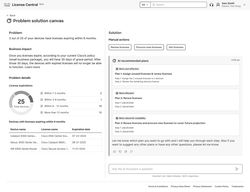 Problem-Solving CanvasAn AI-assisted workspace that turns complex issues into structured decision-making. The canvas surfaces the problem, its business impact, and multiple solution paths — helping users evaluate trade-offs and choose the best course of action for their environment. |
Integrating AI
As our Greenfield explorations took shape, one theme kept resurfacing — the potential of AI to make complex systems feel effortless. Beyond dashboards and health scores, we began asking deeper questions: How might we use AI not just to inform users, but to truly assist them? Around this time, I also embarked on my own journey into AI innovation within Cisco, which opened new doors for experimentation, collaboration, and eventually, direct integration into the CLC vision.
Cisco IT AI Hackathon
Right as we began exploring how AI might elevate CLC, I joined a 2-day Cisco IT AI Hackathon, an open forum to think freely and experiment with new possibilities. I teamed up with four designers from different corners of Cisco IT — people I had never worked with before — all united by a shared curiosity about AI’s potential to reshape how we work.
Together, we created “Army of Agents”, a concept for an AI assistant made up of multiple specialized agents working in harmony. Each agent performed a unique role — attending meetings, summarizing discussions, setting reminders, or proactively suggesting next steps — all contributing to a more efficient and balanced workday. Our goal was to simplify the growing complexity of Cisco’s internal tools and workflows while lowering the barrier to AI adoption across the organization.
The project resonated widely, earning a Top 10 recognition out of 200+ submissions. More importantly, it showed how collaboration and imagination — when paired with a strong UX perspective — can make ambitious AI visions feel tangible and attainable.
 “Army of Agents” Dashboard MockupA conceptual dashboard showcasing an ensemble of AI agents — each responsible for a specific task such as meeting notes, scheduling, and reminders. Together, they give users a holistic view of their priorities, focus areas, and intelligent recommendations for action. |  “A Day in the Life” Story FlowA storyboard of key screens illustrating how users interact with the Army of Agents throughout a typical workday. The flow highlights seamless task handoffs between agents, demonstrating how AI can anticipate needs and reduce cognitive load. |  Hackathon Submission & RecognitionThe official submission page for the “Army of Agents” video, presented to Cisco IT’s executive leadership. Our concept placed in the Top 10 out of 200+ entries, earning recognition for innovation, storytelling, and vision for the future of AI at Cisco. |
|---|
Experimental “AI Canvas”
Following the hackathon, I was invited to join a newly formed, cross-disciplinary AI innovation group as a consulting design member. Our mission was intentionally open-ended: explore bold, high-impact AI concepts that could improve workplace productivity — starting internally, but with the potential to evolve into customer-facing experiences.
Our sessions, which we called “Spicy Idea” workshops, encouraged out-of-the-box thinking. Every week, we’d meet for a few hours to brainstorm the most unconventional, high-potential ideas. Everyone came from different domains, bringing diverse perspectives. At the end of each session, we voted on the ideas with the strongest potential to develop further.
One of my “spicy” ideas — a modular mesh-grid dashboard concept that dynamically adapts to user context — was selected for further exploration. This idea later became the foundation for what we called the AI Canvas, an experimental prototype exploring how AI could personalize workspace layouts, surface relevant data automatically, and empower users to shape their own experience.
 AI Dashboard Builder FrameworkEarly concept sketch showing the foundational layout of the AI-powered dashboard builder. The assistant interprets user prompts to generate drag-and-drop UI components, giving users a fast and intuitive way to customize their workspace. |  Interactive Proof of ConceptA refined prototype showcasing the user’s ability to interact directly with the AI assistant — editing, rearranging, and fine-tuning components on the canvas to create a tailored dashboard experience. |  From Concept to AlphaThree sequential screens capturing the evolution of the AI Canvas: from initial proof of concept, to the first Magnetic-based design version, and finally the Alpha release — marking the transition from idea to functional product. |
|---|---|---|
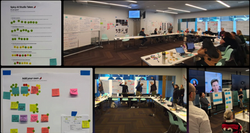 “Spicy Ideas” WorkshopPhotos from one of our creative brainstorming sessions, where team members pitched their boldest “spicy ideas.” The collaborative energy in these sessions helped shape several core features of the AI Canvas. |
Bringing AI into CLC
In parallel, I began prototyping how AI could directly enhance the CLC experience. Partnering closely with one of our engineering leads, I designed and built a coded prototype demonstrating personalized dashboard customization powered by AI.
We recently demoed this concept to leadership during quarterly planning — and the response was overwhelmingly positive. The feature was selected for MVP development in the next quarter, with plans to showcase it at Cisco Live to gather user feedback and conduct formal research studies.
While this marks a significant milestone, it’s also just the beginning. The AI integration journey in CLC is evolving — and this foundation will continue to expand as we explore more ways to make Cisco’s licensing experience smarter, more adaptive, and more human-centered.

My AI explorations — from the hackathon to the experimental canvas — reshaped how I approached CLC. AI was no longer just a feature, but a capability to simplify complexity and empower decision-making. CLC evolved from a licensing tool into a connected platform where data, design, and intelligence work together to drive real impact.
Outcome & Impact
In August 2025, Cisco License Central launched for general availability. Within weeks, our Net Promoter Score rose by 10 points — the first improvement in six years within the licensing ecosystem.
Leadership praised the product for bringing clarity, focus, and action to one of Cisco’s most complex internal systems. The project became a reference model for how design, engineering, and product can partner to deliver durable impact.
CLC not only simplified licensing for thousands of users but also established a scalable framework for future AI-driven tools across Cisco’s portfolio.
 Licensing NPS Sees First Growth in Six YearsA data snapshot showing a 10-point year-over-year increase in Licensing NPS, and a 17-point jump in Q4 FY25 vs. Q4 FY24 — coinciding with the first internal release of Cisco License Central (CLC). This marked the first positive shift in Licensing NPS in over six years, validating the impact of our design and strategy efforts. | 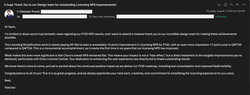 Recognition from Cisco’s CIOA personal message from Cisco’s CIO, following multiple design demos and stakeholder reviews that helped secure funding for CLC’s development. The CIO highlighted that while Cisco’s overall NPS remained flat, the Licensing NPS improvement stood out as a clear sign of meaningful, measurable impact driven by the team’s work. |
|---|
Reflection
Cisco License Central was more than a product — it was a proving ground for vision, resilience, and systems thinking.
It reminded me that the best design work happens when you get close to the complexity: when you learn the process deeply, understand the constraints, and use design to untangle them.
It was also a lesson in empathy — both in how I led the team and how we built for our users.
It’s one of those rare projects that truly changed how an organization thinks about design — and how I think about leadership.
1. Leading Through Ambiguity
Starting from a blank slate taught me how to lead with clarity even when direction was uncertain. With no requirements, framework, or data ready, I had to define structure, priorities, and momentum — proving that design leadership isn’t just about execution, but about creating order from ambiguity.
2. Balancing Speed and Vision
Working under an eight-week deadline demanded quick, decisive action. I learned how to balance immediate delivery needs with long-term vision, ensuring the proof of concept wasn’t just functional but strategically aligned with where the product needed to go.
3. Building Trust Across Teams
Collaboration was key. Partnering with engineering, product, and business leaders meant constantly aligning perspectives. By leading with empathy and transparency, I helped teams rally around a shared goal — turning what could have been siloed efforts into a cohesive partnership.
4. Designing for Longevity
Beyond the prototype, I focused on creating a foundation that could scale. Every decision — from design system choices to data architecture — was made with the future in mind. This mindset helped position Cisco License Central not just as a project, but as a platform built to evolve.